
AI Tools for Fixing Incomplete Tattoo Designs

You have a drawing that just does not feel finished. Maybe you started a sketch for a client but got stuck on how to connect the different elements. It happens to every tattoo artist at some point. AI technology is now a helpful assistant for these exact moments. It helps you see possibilities you might have missed. You can take a rough idea and turn it into a complete piece of art in much less time.
Many artists use these tools to fill in tattoo gaps when they are designing full sleeves or back pieces. It can be hard to find the right small details to bridge two large images. AI looks at your existing style and suggests shapes that fit perfectly. This keeps the flow of the tattoo natural across the body. You no longer have to spend hours staring at a blank space on your tablet.
Another great use is taking a reference image and making it ready for a stencil. You can take a photo to coloring page to get a clear outline of the subject. This saves you hours of manual tracing and lets you focus on the shading and artistic touches. It is a great way to show a client exactly what the line work will look like before you start. You get a clean and crisp guide that makes the tattooing process much smoother.
Use Case 1: Filling Gaps in Large Scale Projects
Large tattoos like sleeves or leg pieces often have awkward empty spaces. These spots are usually too small for a main subject but too large to leave empty. An artist might struggle to think of a filler that matches the theme. If the arm has traditional Japanese waves, the filler needs to have the same weight and curve. AI can analyze the surrounding tattoos and generate filler options that match that specific style.
This process helps maintain the visual balance of the limb. You can upload a photo of the existing work and let the software suggest clouds, smoke, or geometric patterns. It understands the anatomy of the arm or leg. This means the suggested designs will wrap around the muscles in a way that looks intentional. It takes the guesswork out of freehanding filler designs during a session.
Use Case 2: Turning Blurry References into Sharp Stencils
Clients often bring in photos that are low quality. It might be an old picture of a pet or a flower they saw in a garden. Trying to trace a blurry photo is frustrating and leads to mistakes. By using AI to convert these images into line drawings, you get a solid foundation. The tool identifies the most important edges and ignores the background noise.
This is especially helpful for realism artists. You need to know exactly where the highlights and shadows sit. A clear outline allows you to map out your values before the client even sits in the chair. It also helps the client feel more confident. When they see a clean and professional stencil, they know the final result will be high quality. You can print the design directly and use it with your stencil machine.
Use Case 3: Refreshing and Expanding Old Flash Art
Every artist has a folder of old sketches that they never finished. These are great ideas that just lacked a bit of inspiration. You can use AI to breathe new life into these designs. You can upload an old sketch and ask the tool to add more detail or expand the theme. Maybe a simple rose sketch could become a full bouquet with ornate filigree.
This allows you to build a larger portfolio of available flash without starting from zero every day. You can take a central theme and create five different variations in minutes. One might be more traditional, while another is more illustrative. This variety gives your clients more choices. It also helps you find your own voice by seeing how different elements interact with your original drawing.
Use Case 4: Testing Color Palettes and Shading
Deciding on a color scheme is one of the hardest parts of the design process. Once the ink is in the skin, you cannot change it. AI allows you to test dozens of color combinations on your design instantly. You can see how a neo-traditional piece looks with muted earth tones versus bright neons. This helps you and the client make a final decision with confidence.
You can also use these tools to simulate how the tattoo will age. By adjusting the contrast and saturation, you can show the client why certain colors might need to be darker to stay visible over time. It is a powerful communication tool. It bridges the gap between what the artist imagines and what the client expects.
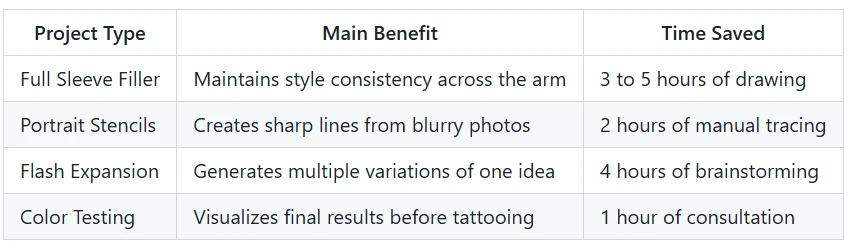
Benefits per Scenario
The following table shows how AI improves the workflow for different types of tattoo projects.
Practical Workflow for Reworking Designs
Using AI in your creative process does not mean the computer is doing the work for you. It is a tool, just like your iPad or your tattoo machine. Here is a simple workflow to follow when you want to finish an incomplete design.
First, you need to digitize your work. If you have a paper sketch, take a high quality photo of it. If you work digitally, export your current progress as a clean file. Make sure the lighting is even and the lines are visible.
Second, upload your design to your chosen AI tool. You will need to provide some direction. If you want to fill a gap, highlight the empty area. If you want to change the style, use keywords that describe the look you want. Do not use complex language. Simple words like bold lines or soft shading work best.
Third, look through the generated options. You will likely see several versions of your design. Some will be exactly what you wanted, and others might be a bit strange. Pick the elements you like from different versions. You can even combine parts of two different AI suggestions.
Fourth, bring the design back into your drawing software. This is the most important step. You must trace over the AI suggestions to make them your own. This ensures the line weights match your personal style. It also allows you to fix any small errors the AI might have made. You are the artist, and the final design should always reflect your hand.
Finally, prepare your stencil. Once you have refined the lines and added your personal touch, your design is ready. You have taken an incomplete idea and turned it into a professional piece of art.
Why This Matters for Modern Creators
The tattoo industry is more competitive than ever. Clients expect high quality work and fast turnaround times. Using modern tools allows you to meet these demands without burning out. It gives you more time to focus on the actual act of tattooing. When you are not stressed about finishing a drawing, you can perform better during the session.
It also helps with creative blocks. Every artist feels uninspired sometimes. AI can provide that small spark that gets your brain moving again. It might suggest a shape or a shadow that you never would have thought of on your own. This keeps your work feeling fresh and exciting.
Conclusion
AI is not here to replace tattoo artists. It is here to help them work smarter. By using these tools to fill gaps, create stencils, and expand on old ideas, you can elevate your art. You save time on the repetitive parts of the job and spend more time being creative. Whether you are working on a small flash piece or a full body suit, these tools offer a new way to look at your designs. Start experimenting with these methods today and see how they change your workflow. You will likely find that your "incomplete" folder starts to get much smaller.
Related Articles












